Kifech t5addem fichiers MKV 3la Mac (bla conversion)
T3allem kifech t5addem fichiers MKV 3la Mac bla conversion. Chouf 3lech QuickTime yefchel, kifech t7ellhom fi MacLC w t5allih lecteur par défaut.
Bil mokhtasar
- QuickTime Player ma ynajemch y7ell fichiers MKV 5ater macOS na9sou démultiplexeur Matroska intégré, mouch 5ater el Mac ma ynajemch ydecodi el vidéo.
- Asra3 tari9a bech t5addem fichiers MKV 3la macOS hiya t'installi lecteur moderne kima MacLC wella IINA elli ya9ra el conteneur nativement.
- Tnajem torbot kol fichiers .mkv b-lecteur elli te5tarou l-dima men fenêtre Lire les informations fil Finder fi tleta clics.
- Remuxing MKV l-MP4 yekhou d9i9a wella zouz bel akther w y7afedh 3la qualité el vidéo, ama ydhaya3 sous-titres stylés w polices madmoujin.
- Ré-encodage MKV b-HandBrake yekhou barcha wa9t w yna9as mel qualité el basariya; dharouri ken lel matériel el 9dim.
Fi hal saf7a
- 3lech QuickTime Player ma ynajemch y7ell fichiers MKV 3la macOS?
- Option 1 (Mansou7 biha): 5addem fichiers MKV direct fi lecteur Mac dédié
- Option 2: Remux fichier MKV l-conteneur MP4 (lossless, fi thweni)
- Option 3: 7awel el vidéo b-HandBrake (ki appareils o5rin yotolbouha)
- 3lech fichier MKV ma fihch sout 3la Mac?
- Kifech ye5dmou sous-titres w barcha pistes audio fi MKV?
- Kifech t5addem fichiers MKV HDR w Dolby Vision 3la écran Mac?
- Chnowa a7sen tari9a bech teta3amel m3a majmou3et MKV mte3ek 3la Mac?
Tnajem t5addem fichiers MKV 3la Mac men ghir ma t7awelhom ki ttelechargi lecteur vidéo gratuit w open-source kima MacLC wella IINA elli fih démultiplexeur Matroska natif. QuickTime Player ma ynajemch y7ell fichiers MKV 5ater macOS na9sou support intégré lel format mta3 el conteneur, mouch 5ater el Mac mte3ek ma ynajemch ydecodi el vidéo elli da5lou.
Ki ta3mel double-clic 3la fichier .mkv 3la macOS, el système y7awel y7ellou fi QuickTime Player, elli fil 7in yrajja3 erreur t9oul elli el fichier mouch compatible. Barcha tutoriels 3al internet yans7ouk techri convertisseurs tijariyin wella t’installi plugins maytin. La hadha la dhek lezem. Hal guide yfassar 3lech QuickTime yorfoch fichiers MKV, yratteb tleta toro9 3amaliya bech teta3amel m3ahom, w ywarrik kifech tconfiguri el Mac mte3ek bech kol MKV yet7all fil 7in b-double-clic.
3lech QuickTime Player ma ynajemch y7ell fichiers MKV 3la macOS?
Sabab elli y5alli QuickTime Player ma ynajemch y7ell fichier MKV yarja3 lel far9 bin conteneur média w codec vidéo. Fichier vidéo kima sandou9 charika mta3 chahn (el conteneur). Da5el es-sandou9 famma pistes média mofrda: vidéo madhghouta, barcha loughat sout, fichiers sous-titres, w marqueurs de chapitres (el codecs w flux élémentaires).
Animation
Inside a video file: one container, many tracks
Sintel.mkvMatroska container
- VideoHEVC · 4K · 10-bit HDR→ Video decoder
- Audio · EnglishE-AC-3 5.1→ Audio decoder
- Audio · FrenchAAC stereo→ Audio decoder
- Subtitles · EnglishSRT text→ Subtitle rendererConverted to MP4 timed text
- Subtitles · JapaneseASS, styled→ Subtitle rendererNo standard place in MP4
El format conteneur Matroska (.mkv), el mo3tamad dawliyan fi IETF RFC 9559, howa wa7ed men a9wa conteneurs média el mawjoudin. Ynajem ylem ta9riban ayy mélange mta3 flux vidéo (H.264, HEVC, AV1, VP9), formats sout multi-canal (Dolby TrueHD, DTS-HD Master Audio, FLAC, AC-3), scripts sous-titres stylés, w polices d’écriture madmoujin.
QuickTime Player, ama, y3ammel 3la framework AVFoundation mta3 Apple, elli ma fihch lecteur Matroska. 7atta ken el vidéo da5el el MKV hiya flux H.264 wella HEVC 3adiya elli el puce Apple Silicon mta3 el Mac mte3ek tdecodiha b-souhoula, QuickTime ye9ef 3and 7add el conteneur. Ma ya3refch kifech y7ell es-sandou9, donc ye9ef w yaffichi erreur.
L-snin, users mta3 Mac kenou yt3addew hal 7add b-plugin tiers esmou Perian. Barcha guides 9dom mezalou y9oulou lel ness t’installiwah. Perian wa9af 3am 2012, w technologiya QuickTime 7 elli ken ye5dem biha tna7at fi macOS 10.15 Catalina. macOS 15 jab media extensions, tari9a jdida lel applications bech yzidou formats lel système, ama Apple ma ta3ti 7atta wa7da l-MKV. Bech t5addem fichiers MKV 3la Mac 7ali, esta3mel lecteur ya9ra MKV wa7dou, wella badel el conteneur.
Option 1 (Mansou7 biha): 5addem fichiers MKV direct fi lecteur Mac dédié
Asra3, andhef w a7sen tari9a mawthou9a bech tetfarrej fi fichiers MKV 3la Mac hiya testa3mel lecteur média ya9ra conteneurs Matroska nativement. Lecture directe ma test7a9ch wa9t traitement, ma tekolch espace disque zayed, w t7afedh 3la kol piste audio, loughat sous-titres w chapitres kima houma.
MacLC, el lecteur elli nasn3ouh fi Hazen Studio, howa lecteur média open-source masnou3 lel Macs Apple Silicon elli ye5dmou b-macOS 26 Tahoe wella ma ajadd. Mabni 3la moteur lecture libVLC mta3 VLC 4, m3a kol chay elli ye7tajou da5el l-application (143 librairies). Y7ell fichiers MKV direct, ydecodi vidéo bil matériel عبر VideoToolbox mta3 Apple, w ywarri el lma3an HDR b-kemel 9owtou 3la écrans Liquid Retina XDR.
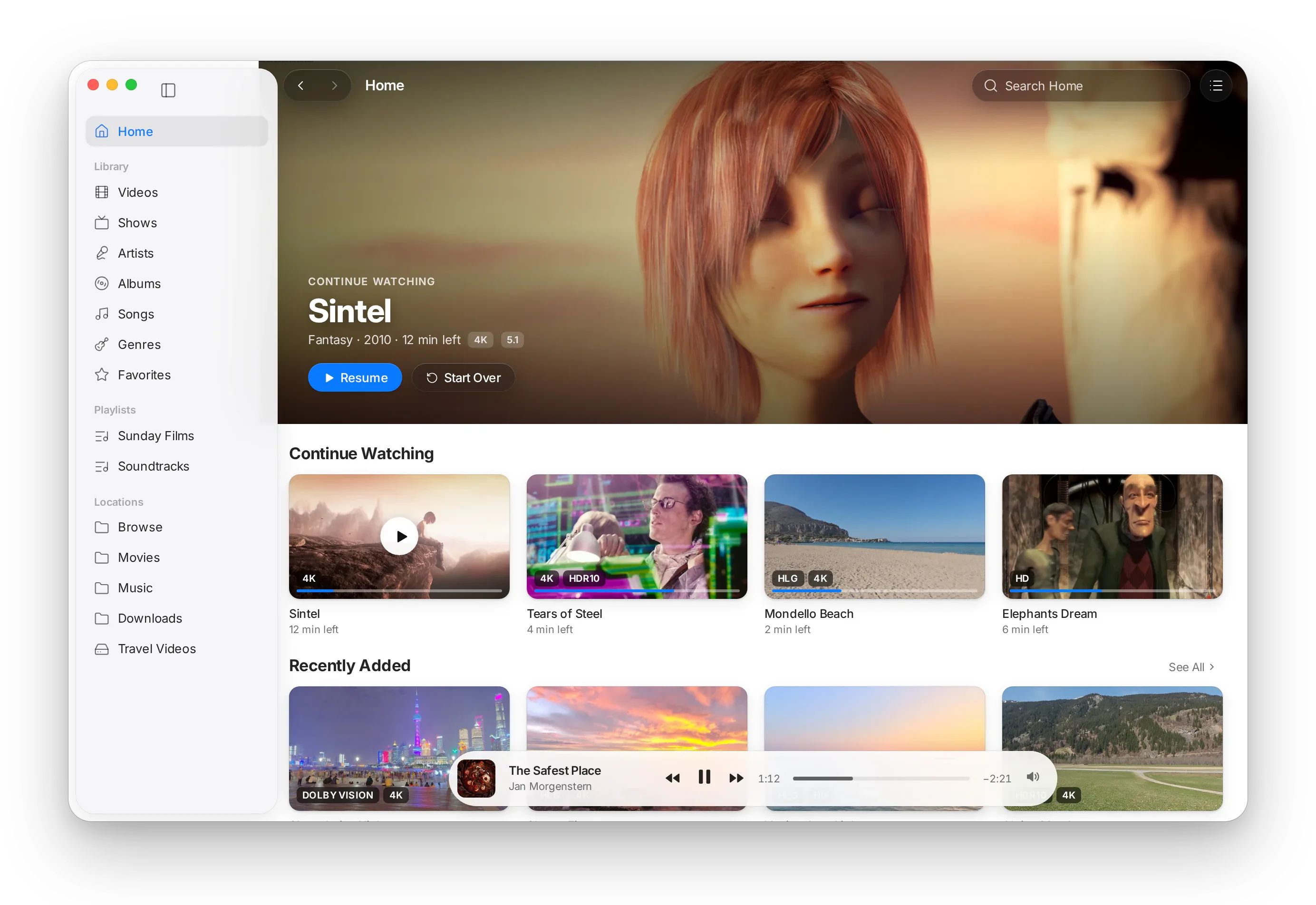
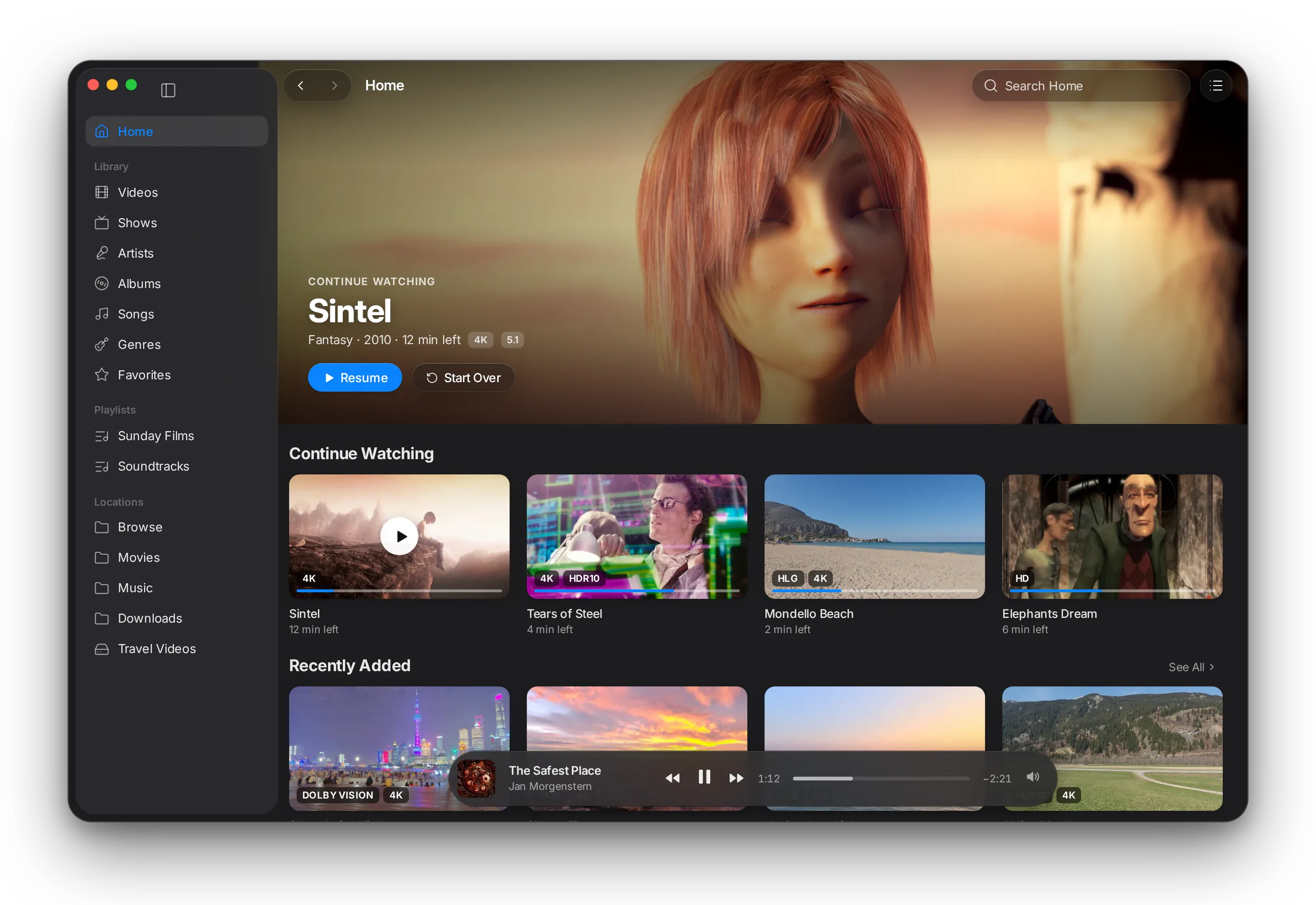
Bech t5addem fichiers MKV 3la Mac b-MacLC, ebba3 hal arb3a maratib:
Mar7la 1: Nazzel l-application
Emchi l-saf7et et-tanzil mta3 el machrou3 w nazzel e5er image disque (fichier .dmg fih 58.4 Mo). Hazen Studio ynachor el checksum cryptographique SHA-256 b-janb lien et-tanzil bech tverifi si7et el fichier. A3mel double-clic 3al .dmg elli nzeltou w ejbed icône MacLC l-dossier Applications mte3ek.
Mar7la 2: Kammel awwel t5dima
5ater MacLC bêta publique elli mouch notarisée men Apple, macOS ywarri dialogue fil awwel t5dima y9oul elli Apple ma najmetch tverifi l-application. Hedha motawa9a3:
- Enzel OK (Done) 3al ta7dhir.
- 7ell Réglages Système w enzel Confidentialité et sécurité fil barre latérale.
- Habet louta l-section Sécurité.
- Enzel Ouvrir quand même b-janb el message 3la MacLC, akked b-Ouvrir quand même marra o5ra, w da5el mot de passe el Mac wella esta3mel Touch ID.
Hal mowafa9a lezem ta3tiha marra wa7da kahaw. El guide mte3na 3la el message « Apple n’a pas pu vérifier » yfassarha b-tafsil. Ba3d awwel t5dima hedhi, MacLC yet7all fil 7in kima ayy application Mac o5ra.
Mar7la 3: 7ell el vidéo MKV mte3ek
Tnajem tawwa t7ell fichiers MKV mte3ek b-tleta toro9:
- Ejbed ayy fichier
.mkvdirect 3la icône MacLC fil Dock mte3ek. - 7ell MacLC, enzel Command-O (wella e5tar Fichier › Ouvrir un fichier…), w e5tar el vidéo mte3ek.
- Zid dossier el aflam mte3ek l-bibliothèque MacLC bech tetصفa7 majmou3tek m3a pochettes, blayes win wsolt w mousalsalat mjam3in b-saisons.
Mar7la 4: Radd el lecteur mte3ek par défaut l-kol fichiers MKV
Bech twa9af QuickTime ma yet7allch ki ta3mel double-clic 3la fichier MKV, configuri macOS bech yorbot naw3 el fichier b-lecteur ej-jdid mte3ek l-dima:
- Lawej 3la ayy fichier
.mkvfil Finder. - A3mel clic droit (wella Control-clic) 3al fichier w e5tar Lire les informations, wella e5tar el fichier w enzel Command-I.
- Fi fenêtre Lire les informations, 7ell section Ouvrir avec: ki tenzel 3al flèche.
- Enzel 3al menu déroulant mta3 l-application w e5tar MacLC (wella lecteur e5er kima IINA).
- Enzel 3al bouton Tout modifier… elli mawjoud direct ta7t el menu.
- Ki macOS ywarri dialogue de confirmation yes2lek ken t7eb t7ell kol documents metchabhin b-hal application, enzel Continuer.
Mel la7dha hedhi, kol fichier .mkv 3la Mac mte3ek ywarri icône el lecteur elli e5tartou w yet7all automatiquement b-double-clic.
Option 2: Remux fichier MKV l-conteneur MP4 (lossless, fi thweni)
Ken dharouri t7ell vidéo fi application Apple kahaw—kima tchouf aperçu b-Quick Look fil Finder, tmonti fi Final Cut Pro, wella t’importi fi application Apple TV—ma te7tajch tdhaya3 sweye3 t3awed tencodi el vidéo. Tnajem ta3mel 3amaliya esmha remuxing.
El remuxing yejbed flux vidéo w audio el asliyin el madhghoutin men conteneur Matroska w y3awed yghallafhom fi conteneur MP4 (.mp4 wella .m4v) men ghir ma y3awed yadhghat pixel wa7ed. 5ater 7atta chay ma yet3awed yetencoda, el remuxing ma ydhaya3 7atta qualité w yekhou ta9riban wa9t naskh el fichier: thweni l-épisode, d9i9a wella zouz l-film kbir.
El outil el standard lel remuxing 3la macOS howa l-utilitaire ligne de commande open-source FFmpeg, m’installi b-Homebrew (brew install ffmpeg). Hal commande tensakh el vidéo w kol pistes audio:
ffmpeg -i movie.mkv -map 0:v:0 -map 0:a -c copy movie.mp4Fi hal commande:
-map 0:v:0 -map 0:aye5tar el vidéo el ra2isiya w kol pistes audio.-c copyyensakhom bit par bit, men ghir transcodage.- Ken el vidéo HEVC, zid
-tag:v hvc19balmovie.mp4, wella QuickTime ynajem yorfoch el fichier.
Wa9teli el remuxing sari3, fih tanazoulet. MP4 (ISO/IEC 14496-14) ma ynajemch yhezz polices madmoujin wella sous-titres SubStation Alpha (.ass) stylés, w sous-titres bitmap Blu-ray (PGS) ma ynajmouch ywalliw texte men ghir OCR, donc ydhi3ou. QuickTime zeda ma ynajemch y5addem sout DTS wella TrueHD 7atta da5el MP4; 7awel heki el piste l-AAC fi blastou (-c:v copy -c:a aac). L-tafsil kemel 3la flags mta3 remux w gestion sous-titres, chouf el tutoriel el kemel mte3na 3la kifech t7awel MKV l-MP4 3la Mac.
Option 3: 7awel el vidéo b-HandBrake (ki appareils o5rin yotolbouha)
Ré-encodage mta3 fichier MKV b-logiciel transcodage vidéo kima HandBrake lezem ykoun e5er 7all. B-3aks el remuxing, el transcodage yfokk kol image mel vidéo el asliya w y3awed yadhghatha marra thaniya fi fichier jdid.
El ré-encodage fih zouz 3ouyoub kbar:
- Ti7 fil qualité: Kol marra tadhghat flux vidéo deja madhghout, et-tafasil ed-d9i9a, grain el film w tadrijat edh-dhel ydhi3ou l-dima (generation loss).
- Wa9t traitement w estihlék batterie: Encodage mta3 film 4K fih sa3tin 3la PC portable ynajem yekhou men 15 d9i9a l-akther men se3a, y5addem CPU w GPU b-9owwa w yfarregh el batterie.
El transcodage dharouri ken ki tenvi tna99el el fichier vidéo l-matériel 9dim na9sou décodeurs codecs jdod, kima port USB mta3 smart TV 9dima, écran karhba, wella console jeux 9dima.
Ken dharouri t3awed tencodi, esta3mel HandBrake el gratuit w open-source:
- Nazzel HandBrake men site officiel mte3ou w 7ell fichier
.mkvel masdar mte3ek. - Fil menu Preset, e5tar Fast 1080p30 lel forja el 3adiya wella Production Standard ken tenvi tmonti el vidéo.
- Ta7t onglet Video, e5tar H.265 (VideoToolbox) k-Video Encoder bech testa3mel encodeur matériel Apple Silicon, elli ykammel fi joz2 sghir men wa9t encodeurs logiciels kima
x265(b-chwaya far9 fil kafa2a). - Enzel Start fil barre d’outils bech tasna3 fichier MP4 ej-jdid.
3lech fichier MKV ma fihch sout 3la Mac?
Wa7da men akther chakeyet users mta3 Mac ki y7ellou fichiers MKV fi lecteurs khfaf hiya elli et-taswira te5dem b-salasa, ama es-sout ma fammach jemla.
Hal mochkel ysir 5ater fichiers MKV haute définition 3adatan yjiw men disques Blu-ray wella masters streaming tijariyin. Hal versions yencodiw sout surround fi codecs audio propriétaires:
- DTS w DTS-HD Master Audio: Mtatwrin men Digital Theater Systems lel cinéma w Blu-ray.
- Dolby TrueHD: Sout multi-canal lossless mabni 3la Meridian Lossless Packing.
- Dolby Digital Plus (E-AC-3): Sout streaming b-kafa2a 3aliya ghaliban m3a Dolby Atmos.
Apple CoreAudio ya3ti décodage natif l-Dolby Digital (AC-3) el 3adi w Dolby Digital Plus, ama ma fih 7atta décodeur natif l-DTS, DTS-HD MA wella Dolby TrueHD. Ki lecteur média basit y3ammel ken 3la décodeurs système mta3 macOS bech y5addem piste MKV, CoreAudio yal9a ID flux audio mouch mad3oum w y5arrej sket.
Bech t7ell hal mochkel, esta3mel lecteur média elli yjib décodeurs audio mte3ou m3ah (kima libavcodec mta3 FFmpeg). MacLC, VLC w IINA ydecodiw DTS w TrueHD wa7dhom w ymixiw-hom l-stéréo lel baffles wella casque mta3 el Mac mte3ek. Fi MacLC, mode sout Voice Boost y3awed ywezen el canal el wostani, w ya3ti lel klem +7.4 dB fou9 el effets el 9wiyin.
Kifech ye5dmou sous-titres w barcha pistes audio fi MKV?
El sabab el ra2isi elli y5alli archivistes el vidéo w mo7ibbin el aflam yfa7lou MKV 3la MP4 howa architecture mta3 pistes el marina. Conteneur MKV wa7ed ynajem y5abbi 3acharat flux audio mosta9lin w loughat sous-titres da5el fichier wa7ed men ghir ma yekhou espace disque zayed kbir.
Fichier MKV wa7ed ynajem yekoun fih:
- Piste 1: Sout asli anglais (Dolby TrueHD 7.1)
- Piste 2: Ta3li9 el mokhrej b-anglais (Stéréo AAC)
- Piste 3: Doublage français (Dolby Digital 5.1)
- Piste 4: Doublage espagnol (Dolby Digital 5.1)
- Piste 5: Sous-titres dialogue kemel anglais SubRip (
.srt) - Piste 6: Anglais SDH (
.srt) l-dha3af es-sam3 - Piste 7: Japonais stylé SubStation Alpha (
.ass) m3a polices stylées madmoujin
Ki t5addem hal fichier fi MacLC, tnajem tbadel bin loughat el sout w pistes ta3li9 fil 7in mel barre de menus ta7t Audio › Piste audio, wella te5tar loughtek ta7t Sous-titres › Piste de sous-titres. Ken piste sous-titre ta5ret wella sab9et chwaya fomm el momethel, tnajem t3addel el wa9t en temps réel b-touche H (bech twarri sous-titres 9bal) wella J (bech t2akher sous-titres ba3d).
Kifech t5addem fichiers MKV HDR w Dolby Vision 3la écran Mac?
Kol MacBook Pro 14-inch w 16-inch men 2021 3andou écran Liquid Retina XDR b-rétroéclairage mini-LED. Hal écrans youslou l-1,000 nits luminosité metwasla 3al écran el kol w 1,600 nits pic de luminosité lel lma3an HDR.
Ama, t5addem vidéo HDR m5abbiya fi conteneur MKV 3la Mac ghaliban ya3ti alwen bahitin w m5amjin wella alwen violet w akhdhar ghriba. Hedha ysir l-sababin:
- Ma fammach support EDR: lecteurs kima VLC 3 ma yesta3mlouch Extended Dynamic Range (EDR) mta3 macOS. Fi blast ma y5alliw el lma3an yousel l-1,600 nits, y7awlou taswiret HDR l-SDR. Bech tefhem el 3ilm wra hal 7add, a9ra el guide mte3na 3la 3lech l-HDR yodh-her bahet 3la Mac.
- Profils Dolby Vision mouch mad3oumin: Remuxes mta3 Ultra HD Blu-ray ghaliban yhezzou Dolby Vision Profile 7 (couche de base HDR10 zayed métadonnées RPU dynamiques), wa9teli fichiers streaming yesta3mlou souvent Profile 5 (fi espace couleur IPTPQc2). El lecteurs elli ma yed3mouch Profile 5 ywarriw hal fichiers b-violet w akhdhar.
MacLC y7ell el zouz. Ki t7ell fichier MKV HDR, y9is el écran elli fenêtre mte3ou 3lih w y5addem Dolby Vision profils 5, 7 (couche de base w RPU), 8.1 w 8.4, HDR10+, HDR10 w HLG b-isti3mal headroom HDR mta3 écranek. Y5alli zeda sous-titres fi abyadh SDR, bech ma yech3louch fi wajhek wa9t scènes edh-dhalma.
Chnowa a7sen tari9a bech teta3amel m3a majmou3et MKV mte3ek 3la Mac?
Ma tdhaya3ch sweye3 men wa9tek w gigaoctets men stockage PC mte3ek t7awel fi fichiers MKV l-format MP4. Matroska howa conteneur maftou7, moderne w 9wi barcha elli y7afedh 3la mixages audio el asliyin mta3 studio, sous-titres b-barcha loughat, w alwen HDR mta3 vidéowatek.
As-hal tari9a hiya t’installi lecteur Apple Silicon dédié. Ki tnazzel MacLC w t7ottou k-application par défaut عبر fenêtre Lire les informations fil Finder, el Mac mte3ek bech y7ell ayy fichier MKV fil 7in, m3a HDR 7atta l-9ammet écranek, kol piste audio w sous-titre, w bla conversion.
L-tafasil techniques akther 3la handaset el conteneurs, chouf el mo9arna bin MKV vs MP4 3la Mac wella el guide mte3na l-tasli7 erreurs compatibilité QuickTime.
As2ela yet3awdou
El Mac ynajem y5addem fichiers MKV nativement?
QuickTime Player elli yji m'installi m3a Apple ma ynajemch y7ell fichiers MKV nativement 5ater AVFoundation ma ya3refch conteneur Matroska. Ama matériel mta3 el Mac mte3ek ynajem ydecodi el flux vidéo elli da5el b-souhoula b-lecteur tiers gratuit kima MacLC wella IINA.
Kifech n5alli MacLC wella IINA el lecteur par défaut lel fichiers MKV?
A3mel clic droit 3la ayy fichier .mkv fil Finder, e5tar Lire les informations (Command-I), 7ell section Ouvrir avec, e5tar el lecteur mte3ek mel lista, w enzel Tout modifier.
3lech ma fammach sout ki n5addem fichier MKV 3la Mac?
El vidéowat MKV ghaliban fihom sout multi-canal kima DTS, DTS-HD Master Audio wella Dolby TrueHD, w macOS ma 3andouch décodeur lihom. El lecteurs elli y3amlou 3la décodeurs macOS y5addmou et-taswira fi sket; el lecteurs elli fihom décodeurs mte3hom, kima MacLC, VLC w IINA, y5addmou es-sout.
Najjem n'installi plugin bech n5alli QuickTime y5addem fichiers MKV?
Fil 3amali lé. El plugin el ma3rouf Perian wa9af 3am 2012, w technologiya QuickTime 7 elli ken ye5dem biha tna7at fi macOS 10.15 Catalina (2019). Men macOS 15, el développeurs ynajmou yba3thou media extensions yzidou formats lel système, ama Apple ma ta3ti 7atta wa7da l-MKV. Lecteur ya9ra MKV wa7dou howa el 7all el basit.
Ta7wil MKV l-MP4 yna9as men qualité el vidéo?
Ken ta3mel remux lel fichier b-ffmpeg, el flux vidéo w audio yetnas5ou octet b-octet men ghir ré-encodage, b-0 na9s fil qualité. Ama ken ttranscodi el fichier b-HandBrake wella convertisseur 3al internet, el vidéo tet3awed tetdhghat, elli ydhayya3 et-tafasil ed-d9i9a w yekhou barcha wa9t traitement.