Motion interpolation and the soap opera effect, explained
What motion interpolation is, why it triggers the soap opera effect, and how modern AI frame generation compares on 120 Hz displays.
In short
- Motion interpolation calculates vector displacement between two video frames to synthesize brand-new intermediate frames in real time.
- The soap opera effect occurs because high frame rates remove the cinematic motion blur associated with traditional film cameras.
- Traditional hardware interpolation produces haloing and occlusion tearing around fast-moving edges, whereas neural AI models like RIFE reduce artifacts.
- Interpolation excels for fast-paced sports, nature documentaries, and 2D animation, but undermines narrative drama and film cinematography.
On this page
- How does motion interpolation work under the hood?
- Why does interpolation trigger the soap opera effect?
- What causes halos, tearing, and interpolation artifacts?
- Where does motion interpolation actually shine?
- How does MacLC handle motion interpolation on Apple Silicon?
- What are the TV manufacturer names for motion smoothing?
- Choosing when to use motion smoothing
Motion interpolation is a digital video processing technique that analyzes consecutive video frames, calculates the direction and speed of moving pixels, and synthesizes entirely new intermediate frames in real time. By inserting these generated frames between original source frames, a display or media player converts a 24-frame-per-second (fps) film into 60 fps, 120 fps, or higher.
While higher frame rates produce fluid motion, they also trigger the infamous “soap opera effect”—a visual phenomenon where high-budget cinematic films suddenly look like cheap, videotaped daytime television. Understanding the mathematics of motion estimation explains why motion smoothing causes visual distortion, where the technology legitimately excels, and how modern neural networks are reshaping frame synthesis.
Animation
24 frames a second, and the frames in between
Original 24 fps
Interpolated up to your screen’s refresh rate
How does motion interpolation work under the hood?
Standard video displays reproduce motion by showing a sequence of static photographic snapshots. In a standard film shot at 24 fps, each frame remains on screen for roughly 41.67 milliseconds.
When a display or video player applies motion interpolation (technically designated as Motion Estimation / Motion Compensation, or MEMC), it does not merely duplicate existing frames. Duplicating frames changes nothing about the motion; it simply repeats identical image data. Instead, an interpolation engine creates new, unseen frames:
- Motion Estimation: The engine compares Frame A and Frame B. It divides Frame A into small pixel blocks (in traditional algorithms) or dense pixel grids (in optical flow) and searches Frame B to find where those blocks moved.
- Motion Vector Field: The algorithm generates a mathematical vector map representing the velocity and trajectory of every pixel cluster (for instance, an actor walking left at 12 pixels per frame while a car drives right at 40 pixels per frame).
- Motion Compensation (Synthesis): The engine constructs an intermediate frame positioned temporally halfway between Frame A and Frame B (at temporal offset
t = 0.5). It shifts each pixel block along its calculated vector path and blends the result.
If an engine converts 24 fps film to 120 fps on an Apple ProMotion display, it synthesizes four brand-new frames for every single original frame delivered by the video file. Four out of every five frames you see are made up by an algorithm.
Why does interpolation trigger the soap opera effect?
The term “soap opera effect” originates in the broadcast history of American television. From the 1950s through the 1990s, entertainment media was divided into two distinct technical tiers:
- Prestige Cinema and Primetime Drama: Shot on physical 35mm film at 24 fps with a 180-degree mechanical rotary shutter. Each frame had an exposure time of 1/48 second. This exposure duration created natural optical motion blur that softened moving edges and disguised the artificiality of makeup, props, and lighting.
- Daytime Soap Operas and News Broadcasts: Recorded on inexpensive analog and digital video cameras at 60 fields per second (60i). With high temporal capture rates, movement was exceptionally fluid and sharp, possessing almost zero motion blur.
Because generations of viewers grew up watching low-budget soap operas on fluid video and cinematic masterpieces on 24 fps film, the human brain developed a deep psychological association: high-frame-rate fluidity signals cheap video cameras, artificial sets, and non-cinematic production.
When you force a 24 fps Hollywood film through a 120 fps interpolation algorithm, that cinematic illusion collapses:
- Loss of Aesthetic Distance: Cinema relies on motion blur to soften reality into an artistic dreamscape. Hyper-smooth interpolation brings reality into harsh focus.
- Exposed Production Values: Without natural shutter blur, actors look like people wearing costumes on a physical set under studio spotlights. Prop swords look like painted plastic, and stunts look visibly choreographed.
This is why filmmakers such as Christopher Nolan and Paul Thomas Anderson lobbied TV makers about default settings, and why Tom Cruise recorded a public message in 2018 asking viewers to turn motion smoothing off.
What causes halos, tearing, and interpolation artifacts?
Even when viewers do not mind the soap opera effect, motion interpolation frequently introduces distracting visual artifacts. These glitches occur because mathematical motion estimation must guess what happens in regions of the screen it cannot see.
The primary technical failures include:
1. Occlusion and haloing
The most common interpolation artifact is haloing—a distorted, gelatinous shimmer around the edges of a moving subject.
Consider an actor walking past a detailed brick wall:
- In Frame A, the actor covers brick patch X.
- In Frame B, the actor has moved, exposing brick patch X to the camera.
When the interpolation engine attempts to synthesize an intermediate frame halfway between A and B, it cannot determine what brick patch X looks like at t = 0.5, because the actor is still partially covering it. In standard block-matching algorithms, the engine guesses by smearing pixels from surrounding areas, creating a shimmering aura or “halo” that tracks the actor’s silhouette.
2. Fast motion and edge tearing
When objects move faster than the algorithm’s search radius—such as a tennis ball whipped across the frame or an athlete swinging a golf club—the motion estimation engine loses tracking entirely. The moving object becomes fragmented, appearing as two overlapping ghost images or breaking apart into jagged digital tearing.
3. Rapid cuts and scene transitions
When a movie abruptly cuts from a close-up conversation to an exterior explosion, the two frames share zero spatial correlation. If the interpolation engine fails to detect the scene cut within a fraction of a millisecond, it attempts to morph the actor’s face into the explosion, producing a grotesque, split-second visual smear.
Where does motion interpolation actually shine?
Despite its destructive impact on narrative filmmaking, motion interpolation is not inherently bad technology. When applied to content types that do not rely on traditional film aesthetics, frame synthesis delivers clear, measurable benefits:
| Content Type | Interpolation Suitability | Key Benefit |
|---|---|---|
| High-Speed Sports | Exceptional | Sharpens rapid ball tracking, hockey puck movement, and fast camera whips |
| Nature Documentaries | Excellent | Smooths sweeping aerial helicopter and drone landscape pans |
| 2D Anime & Animation | Popular, results vary | Smooths pans; drawings held on “twos” or “threes” can warp |
| Video Games (Passive Playback) | High | Eliminates stepping during gameplay capture replays |
| Narrative Feature Films | Poor | Triggers the soap opera effect and destroys cinematic shutter blur |
In broadcast sports, camera operators constantly whip-pan across stadiums following fast balls and running athletes. At standard broadcast frame rates, rapid pans cause intense motion blur and eye strain. Frame interpolation clarifies player jerseys and ball flight paths.
Similarly, in traditional hand-drawn animation, artists draw character movement at 8 or 12 distinct drawings per second (animating on “threes” or “twos”) over a 24 fps background. AI models such as RIFE smooth camera pans in animation with fewer distortions than older methods, though many fans prefer the original timing of the drawings.
How does MacLC handle motion interpolation on Apple Silicon?
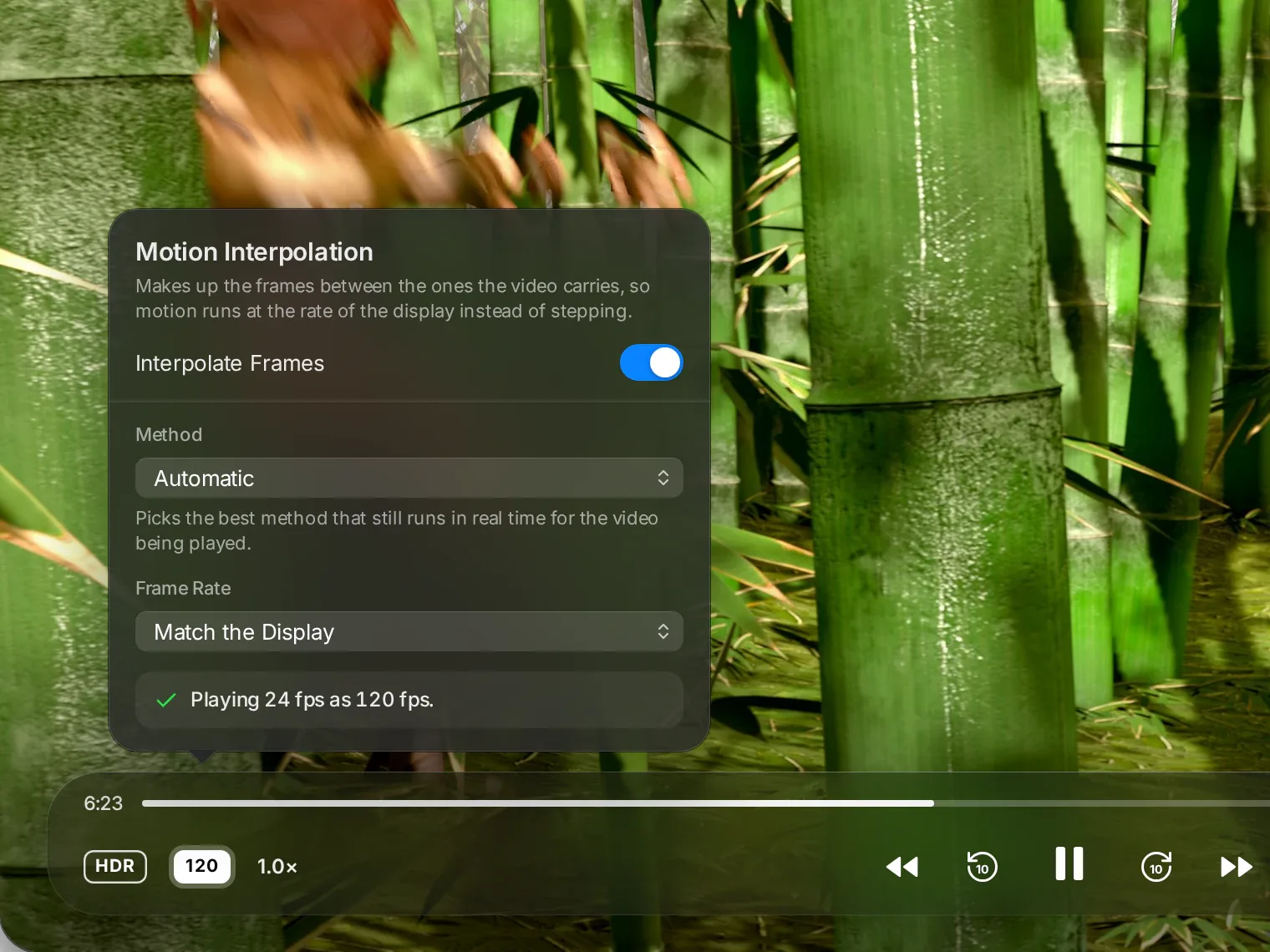
Many media players leave frame interpolation to third-party tools or command-line filters. In MacLC, we built a motion engine (maclc_frc) for Apple Silicon.
How it works:
- Off by default: MacLC never turns motion smoothing on by itself. It stays off until you click it on the playback bar.
- Up to your display’s refresh rate: on a MacBook Pro with a 120 Hz ProMotion display, 24 fps film can be shown at 120 fps when interpolation is on.
- The RIFE neural network: instead of relying only on block matching, which creates halos, MacLC bundles RIFE v4.25 (Real-Time Intermediate Flow Estimation) running through Core ML. RIFE handles occlusions and complex motion better, with fewer halos.
- Apple optical flow (
VTFrameRateConversion): MacLC can also use Apple’s own frame-rate conversion in VideoToolbox. - More engines and a safety net: low-latency interpolation, block motion compensation in Metal, simple blending, and SmoothVideo Project when SVP 4 Mac is installed. Automatic picks what your Mac can keep up with and steps down rather than dropping frames, for example with a demanding 4K HDR file on an entry-level chip.
What are the TV manufacturer names for motion smoothing?
If you are watching video on an external television or home theater display, motion interpolation is almost certainly enabled by default right out of the box. Display manufacturers use proprietary trade names to market their MEMC engines.
To turn off the soap opera effect or adjust its intensity, look for these specific settings in your television’s picture menus:
- Samsung: look for Auto Motion Plus (older models) or Picture Clarity (newer ones), and set Judder Reduction and Blur Reduction to 0, or turn the setting off.
- LG: look for TruMotion, in the advanced picture settings under Clarity. Options vary by model; Off disables interpolation.
- Sony: look for Motionflow in the picture settings. Off, or a custom setting with Smoothness at its minimum, restores native film motion.
- Panasonic: Look for Intelligent Frame Creation (IFC) or 24p Smooth Film.
- Philips: Look for Natural Motion or Perfect Natural Motion.
- Hisense: Look for Ultra Smooth Motion or Motion Enhancement.
The emergence of Filmmaker Mode
To eliminate consumer confusion caused by competing proprietary menu names, the UHD Alliance—an international coalition of consumer electronics manufacturers, film studios, and post-production facilities—officially introduced Filmmaker Mode in August 2019.
When you switch your television to Filmmaker Mode:
- All motion interpolation and smoothing algorithms are automatically disabled.
- The display keeps the content’s original frame rate. To understand how refresh rates interact with film cadence, read our analysis on 24 fps judder and 120 Hz displays.
- Artificial edge sharpening and aggressive noise-reduction filters are disabled.
- The color temperature is calibrated to the cinematic industry standard D65 (6,500 Kelvin).
Choosing when to use motion smoothing
Motion interpolation is neither a miracle feature nor an unmitigated disaster; it is a specialized tool. In narrative cinema, where suspension of disbelief and atmospheric lighting reign supreme, frame interpolation breaks the magic of filmmaking and should remain off.
However, for high-velocity sports, wildlife documentaries, and hand-drawn animation, modern AI-driven motion engines like RIFE provide extraordinary visual fluidity. Understanding how the technology operates gives you full control over how you experience your media. To try RIFE and Apple’s optical flow on your own videos, download MacLC, free for Apple Silicon Macs.
Questions people ask
What is motion interpolation in televisions and video players?
Motion interpolation, often called Motion Estimation / Motion Compensation (MEMC), is a video processing technique that analyzes two consecutive frames, tracks how objects move across the screen, and mathematically generates entirely new in-between frames to increase the video's frame rate.
Why is it called the soap opera effect?
In the 20th century, prestige films were shot on 24 fps celluloid with natural optical motion blur, while low-budget daytime soap operas were recorded on 60i video cameras. When modern displays interpolate 24 fps film to 60 or 120 fps, the hyper-smooth motion mimics cheap video tape, making movie sets look artificial.
What are the common artifacts caused by motion smoothing?
Traditional block-matching interpolation struggles with occlusion—when an object passes in front of a background. This creates visual tearing, rippling water artifacts, and a distinct shimmering halo around moving actors or fast-flying sports balls.
What is Filmmaker Mode on modern televisions?
Filmmaker Mode is a standardized display preset developed by the UHD Alliance and Hollywood directors. Selecting it turns off motion smoothing and other processing, keeps the original frame rate and aspect ratio, and sets the standard D65 white point.
How do you turn off the soap opera effect on major TV brands?
Navigate to your TV picture settings. Look for Picture Clarity or Auto Motion Plus on Samsung, TruMotion on LG, Motionflow on Sony, Intelligent Frame Creation on Panasonic, Natural Motion on Philips, or Ultra Smooth Motion on Hisense, and toggle the feature to Off.